Proofreading tips
In last week's post I noted that spellchecking software is a good start, but is by no means infallible. You'll need to check your text as thoroughly as possible for all the things that the spellchecker will miss.
Tip 1. Leave your writing and come back to it. If you just typed a paragraph, you'll think it is right because you just typed what was in your head, didn't you? So if you read it then, you'll probably miss some mistakes.
Tip 2. Read your text out loud. This helps to pick up things like long sentences, and subject-verb disagreement. It will also help with things that literally don't 'sound right'. I read one of my chapters and picked up the fact that no film should ever be described as an 'epic biopic' - not even Lawrence of Arabia.
Tip 3. Proofread on paper. when I print a copy for proofreading, I make some simple changes of format to aid readability. For example, I like to change to a serif font such as Times New Roman or Garamond, and also change the line spacing. This can help pick up the use of the same word in adjacent sentences.
Tip 4. Proofread one line at a time. Sometimes I've been proofreading and thinking 'gosh this paragraph is great', and get really into it. But when I do there's a tendency to skip a word or two. By using a ruler, or even a piece of paper, I can concentrate on one line at a time. This can feel like learning to read again, following each word with your finger, but that's a good idea too!
Tip 5. Take your time. A luxury we don't always have, but your success rate for catching errors will fall if you rush things.
Tip 6. Read a sentence at a time, out of sequence. There's a psychological idea at work here - if you read sentences in sequence, your brain knows what is coming next, and will 'error-correct' for you - so you might miss something. By reading sentences out of sequence, you avoid this trap. Naturally, if you try to read sentences completely at random, it can be difficult to keep track of which sentences you have checked. I mark the end of each sentence with a tick to show I've read it.
Tip 7. Do it again. One pass won't be enough for all but the shortest of pieces. You should proofread several times, concentrating on different aspects of your work, such as spelling, punctuation, subject-verb agreement, and so on. It's also worth noting another reason for proofreading several times - your work may be publication-ready, but you may find yourself adding things. Since my book is about achievements of people at particular ages, if there's a news story about a 70-year-old mother, or a 97-year-old skydiver, I want to change my book to include them. And new text, or even amended text, requires proofing again.
Sunday, 26 April 2009


Sunday, 19 April 2009
Getting your book right
Once I made the decision to publish The Octogenarian Ski-jumper myself, I took on all those tasks that a publisher would normally do. I'm going to leave aside any discussions about what publishers actually do and don't do with respect to books, since I'm not experienced in that area. But the key point is that most self-publishing routes require you, as the author, to do a lot more work. Now as a writer you have been doing the writing, and it is fair to assume that you are close to happy with the content of your book. But there's a lot more things to do before the book can be considered publishable.
I've touched on a couple of these items in earlier posts. In one I described the frontmatter - all those things that a printed book contains that aren't the actual contents - things like a title page, the copyright page, a table of contents, and lists of illustrations if you have them. In another I described how to use the features of Microsoft Word 2007, specifically Microsoft Word 2007 sections, to get a professional appearance for pages by using headers and footers.
But the most important thing is to get the content right. Are you the sort of person who gets annoyed by misprints, poor formatting, or inconsistencies in what you read? Even if you aren't, many of your readers will be. And an unsatisfied read is a LOT less likely to pass on a recommendation about your book to a friend.
The first thing you should do is to spellcheck your book. But I stress, this is only the first thing you should do. Spellchecking software will find some errors, but will also report 'false positives' where it indicates that a word isn't in its dictionary. If your book is a novel that deals with the modern day, you won't have too many of these: but if you write science fiction, say, or technical terms, or have a lot of foreign words, your spellchecker will highlight a lot of words as wrong when they aren't. You can usually add words to your spellchecker's dictionary, which goes some way towards solving a problem.
More serious than that are the things the spellchecker misses. Consider the two phrases:
- There is a French window in every bedroom, affording delightful prospects
- There is a French widow in every bedroom, affording delightful prospects
A spellchecker won't save you from embarrassment here. (Incidentally, that delightful second line with its second meaning arising from one missing letter comes from the late and great Gerard Hoffnung, in a sketch he wrote about mistranslations.)
In a future post I'll be addressing how to overcome some of the problems that the spellchecker can't handle.
Sunday, 12 April 2009
Books like The Octogenarian Ski-jumper
I was asked this week what my book is like. Some books fit into a nice neat genre; if you're writing a recipe book, you can say that and people will understand. They can then ask whether the book is about barbecue cooking, or baking, or chinese cuisine. Similarly, if you're writing a novel, it may fit into a genre - science fiction or romance being the most obvious examples, but there are genres for chick lit, gay fiction, historical novels, thrillers - the list goes on.
You have a much harder job on your hands if your book doesn't have a genre. Firstly, you have a harder job to explain what the book is; secondly, if you approach a bookseller (and this applies whether or not you are considering the self-publishing route), they'll want to know which shelf they should put it on. If they can't work out where to put it, they are much less likely to stock it.
My own personal preference when people ask me what type of book I've written is to say 'it's a bog book' - these are books that live in the smallest room in the house. I know that opinions are divided on reading in the toilet. I should perhaps apologise for the use of the word, but in general, in the UK where I live, the word does not offend and the euphemism 'bathroom' is not, frankly, accurate. Perhaps I should suggest that the genre is 'bog books' in the UK and 'bathroom books' elsewhere. One of the advantages of this name is that it does accurately represent where such books may typically be found: and an advantage for the author is that books placed in such a location are much more likely to be read by visitors than those on the bookshelves. And browsing readers are much more likely to buy...
Anyway, here are some of the books that are like The octogenarian Ski-jumper. Or perhaps, in deference to the authors and to the order of publication, I should say that my book is similar to these. I think of these as 'light reference', to distinguish them from heavier reference books such as dictionaries and encyclopedias. At the lighter end of the scale, these books, mine included, would rub shoulders (or perhaps that should be spines) with trivia fact books, lists of humorous quotations, and joke books.
Brewer's Dictionary of Phrase and Fable, by Ebenezer Cobham Brewer
Simply the best dipping book of all time. The only drawback with this delight is that if you try to look something up in it, you are unlikely to find what you want simply because you will be distracted by the enchanting entries on other pages. My hopes for this book are twofold. One, that it will never be out of print; and two, that any electronic version will offer, along with accurate searches of the key phrases, inaccurate ones so that future users of the book can be as entertained as past readers.
Extraordinary Origins of Everyday Things, by Charles Panati
Four hundred or so pages of fascinating information on the origins of words, phrases, and the objects we use every day.
The Oxford Dictionary of Dates, edited by Cyril Leslie Beeching
This book is probably the closest model for mine; information about the birth and death dates, and the dates of key achievements of the famous and infamous.
Who Lies Where, by Michael Kerrigan
Where Are They Buried, by Todd Benoit
These two books have identical themes; Michael Kerrigan's book lists the last resting places of people interred in the UK, and Todd Benoit's book lists those of people interred in the USA. Both are packed with information about those listed. Worth having as you travel around.
The Book of Lists, by David Wallechinsky, Irving Wallace and Amy Wallace
Probably the most eclectic light reference book ever written; I remember getting a copy in the late 1970s and poring over it, by turns fascinated and bewildered by the information it contained. There have been a variety of sequels and different editions over the years.
I didn't know that about England, by Christopher Winn
A recent gift, and a delight - organised by the traditional counties of England, it manages to avoid recycling the things that reasonably informed people do know about places, and entertain with the less travelled byways of England's history.
You have a much harder job on your hands if your book doesn't have a genre. Firstly, you have a harder job to explain what the book is; secondly, if you approach a bookseller (and this applies whether or not you are considering the self-publishing route), they'll want to know which shelf they should put it on. If they can't work out where to put it, they are much less likely to stock it.
My own personal preference when people ask me what type of book I've written is to say 'it's a bog book' - these are books that live in the smallest room in the house. I know that opinions are divided on reading in the toilet. I should perhaps apologise for the use of the word, but in general, in the UK where I live, the word does not offend and the euphemism 'bathroom' is not, frankly, accurate. Perhaps I should suggest that the genre is 'bog books' in the UK and 'bathroom books' elsewhere. One of the advantages of this name is that it does accurately represent where such books may typically be found: and an advantage for the author is that books placed in such a location are much more likely to be read by visitors than those on the bookshelves. And browsing readers are much more likely to buy...
Anyway, here are some of the books that are like The octogenarian Ski-jumper. Or perhaps, in deference to the authors and to the order of publication, I should say that my book is similar to these. I think of these as 'light reference', to distinguish them from heavier reference books such as dictionaries and encyclopedias. At the lighter end of the scale, these books, mine included, would rub shoulders (or perhaps that should be spines) with trivia fact books, lists of humorous quotations, and joke books.
Brewer's Dictionary of Phrase and Fable, by Ebenezer Cobham Brewer
Simply the best dipping book of all time. The only drawback with this delight is that if you try to look something up in it, you are unlikely to find what you want simply because you will be distracted by the enchanting entries on other pages. My hopes for this book are twofold. One, that it will never be out of print; and two, that any electronic version will offer, along with accurate searches of the key phrases, inaccurate ones so that future users of the book can be as entertained as past readers.
Extraordinary Origins of Everyday Things, by Charles Panati
Four hundred or so pages of fascinating information on the origins of words, phrases, and the objects we use every day.
The Oxford Dictionary of Dates, edited by Cyril Leslie Beeching
This book is probably the closest model for mine; information about the birth and death dates, and the dates of key achievements of the famous and infamous.
Who Lies Where, by Michael Kerrigan
Where Are They Buried, by Todd Benoit
These two books have identical themes; Michael Kerrigan's book lists the last resting places of people interred in the UK, and Todd Benoit's book lists those of people interred in the USA. Both are packed with information about those listed. Worth having as you travel around.
The Book of Lists, by David Wallechinsky, Irving Wallace and Amy Wallace
Probably the most eclectic light reference book ever written; I remember getting a copy in the late 1970s and poring over it, by turns fascinated and bewildered by the information it contained. There have been a variety of sequels and different editions over the years.
I didn't know that about England, by Christopher Winn
A recent gift, and a delight - organised by the traditional counties of England, it manages to avoid recycling the things that reasonably informed people do know about places, and entertain with the less travelled byways of England's history.
Sunday, 5 April 2009
Headers and footers
In an earlier posting I described how I laid out the frontmatter of the book - the title page, the copyright page, and so on. I noted that the frontmatter doesn't usually have page numbers - or if it does, they are probably roman numbers instead of arabic ones, and the first few pages of the frontmatter NEVER have numbers even if the later ones do. I wanted my book to have that same professional appearance, and so in this posting I'm going to address how to use headers and footers.
I should add at this point that I'm using Microsoft Word 2007, so the instructions are for that software product. The principles I discuss should be exactly the same, but the way you choose the options will probably differ.
Once you've got all your text (including the frontmatter) in a document and are ready to format it, you will need use sections. A section is simply a chunk of text, which is allowed to have its own header and footer. More importantly, for a section you can define several things:
You can choose a section that will start on the next even numbered page or next odd numbered page. The 'next odd-numbered page' option is very useful if you want to leave a blank right-hand page to separate one chapter from the next.
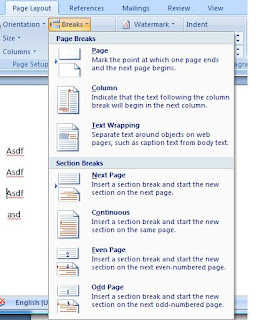
Because you put the cursor where you want the second section to start, Word will automatically create a section for the text before the cursor position.
Once you have defined your section, you can most easily see which section you are in by double-clicking in the header or footer areas. When the cursor is in one of these, you will see a label which gives the section number, like this
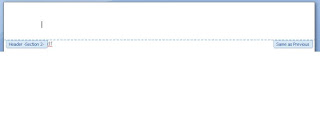
Note that on the right-hand side, you can see the informational message 'Same as Previous'. This means that the contents of the header (or the footer) is the same as that in the previous section. You control this by the 'link to previous' option which looks like this
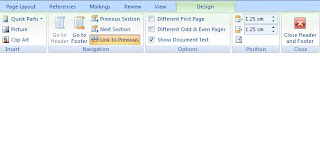
When might you want to use - or not use - link to previous? Well, consider the chapters footers - they are probably all the same, across all chapters - they probably all contain the page number. By ensuring that all your footers for the chapter sections have 'link to previous', except the first one, in which you insert a page number, all footers will have the same format - that is, incrementing page numbers - which is exactly what you want.
Next, let's consider why you'd want to use the options listed above - headers and footers for the first page, left-hand page, and right-hand page. Well, if you look at most books with chapters, the first page in a chapter doesn't have a header. however, the second and subsequent pages do. In many books, the even-numbered pages (which are on the left, and which printers refer to as verso) have the book title as a header, and the odd-numbered pages (which are on the right, and which printers refer to as recto) have the chapter title as a header. If you want this, then you can select the 'Different First Page' and 'Different Odd and Even Pages' checkboxes, and then put in the values you want.
In my book, my frontmatter section has the following settings
The first chapter section has the following settings
I should add at this point that I'm using Microsoft Word 2007, so the instructions are for that software product. The principles I discuss should be exactly the same, but the way you choose the options will probably differ.
Once you've got all your text (including the frontmatter) in a document and are ready to format it, you will need use sections. A section is simply a chunk of text, which is allowed to have its own header and footer. More importantly, for a section you can define several things:
- The header for the first page in a section
- The footer for the first page in a section
- The header for the odd-numbered pages in a section
- The footer for the odd-numbered pages in a section
- The header for the even-numbered pages in a section
- The footer for the even-numbered pages in a section
You can choose a section that will start on the next even numbered page or next odd numbered page. The 'next odd-numbered page' option is very useful if you want to leave a blank right-hand page to separate one chapter from the next.

Because you put the cursor where you want the second section to start, Word will automatically create a section for the text before the cursor position.
Once you have defined your section, you can most easily see which section you are in by double-clicking in the header or footer areas. When the cursor is in one of these, you will see a label which gives the section number, like this

Note that on the right-hand side, you can see the informational message 'Same as Previous'. This means that the contents of the header (or the footer) is the same as that in the previous section. You control this by the 'link to previous' option which looks like this

When might you want to use - or not use - link to previous? Well, consider the chapters footers - they are probably all the same, across all chapters - they probably all contain the page number. By ensuring that all your footers for the chapter sections have 'link to previous', except the first one, in which you insert a page number, all footers will have the same format - that is, incrementing page numbers - which is exactly what you want.
Next, let's consider why you'd want to use the options listed above - headers and footers for the first page, left-hand page, and right-hand page. Well, if you look at most books with chapters, the first page in a chapter doesn't have a header. however, the second and subsequent pages do. In many books, the even-numbered pages (which are on the left, and which printers refer to as verso) have the book title as a header, and the odd-numbered pages (which are on the right, and which printers refer to as recto) have the chapter title as a header. If you want this, then you can select the 'Different First Page' and 'Different Odd and Even Pages' checkboxes, and then put in the values you want.
In my book, my frontmatter section has the following settings
- First page header - blank
- First page footer - blank
- Even page header - blank
- Even page footer - blank
- Odd page header - blank
- Odd page footer - blank
The first chapter section has the following settings
- First page header - blank
- First page footer - include page number
- Even page header - BOOK TITLE (The Octogenarian Ski-jumper in my case)
- Even page footer - contains page number
- Odd page header - CHAPTER TITLE (Childhood)
- Odd page footer - contains page number
- First page header - same as previous - this ensures that the blank first page headers continue
- First page footer - same as previous - this ensures that the page numbers continue
- Even page header - same as previous - this ensures that the book title continues
- Even page footer - same as previous
- Odd page header - CHAPTER TITLE (Twenties) - note that 'link to previous' must be turned off
- Odd page footer - same as previous
Sunday, 29 March 2009
Frontmatter – what does it contain?
In the last posting I mentioned that when you are considering POD, you have to format the text exactly as you want it. And ‘exactly’ means what it says. You can of course obtain virtually any service, if you can’t or don’t want to do it yourself. But I spent some time looking at a variety of books, and checked out what is in a book apart from the text. The largest part of this is the 'frontmatter' - things like the copyright page, preface, title page and so on which appear before the text itself.
I give below what I saw in a representative range of books, ordered by physical page number. Note that when I refer to page 1, I mean the first printed page, not the cover.
Page 1. Title page. This typically contains the title, and sometimes the author’s name. For example
Page 2. Usually blank, but may contain a list of other books by the same author.
Page 3. Title page again. This typically contains the title, the author’s name, and in contrast to page 1, the name of the publisher. It may also include the sub-title if your book has one. For example
Page 4. The copyright page. At a minimum, this will contain the author’s name, the copyright symbol ‘©’ and the year of publication. It will typically also contain the ISBN number of the book, the name and sometimes the address of the publisher, website information associated with the book and/or the author, and legal information. the font used for the copyright page is usually slightly smaller than for the rest of the text. For example:
Copyright © by Martin McGovern 2009
Martin McGovern has asserted his right under the Copyright, Designs and Patents Act 1988 to be identified as the author of this work.
This book is sold subject to the condition that it shall not, by way of trade or otherwise, be lent, resold, hired out, or otherwise circulated without the author’s prior consent in any form of binding or cover other than that in which it is published and without a similar condition, including this condition, being imposed on the subsequent purchaser.
http://octogenarianski-jumper.blogspot.com
Page 5. From this point onward, there is more variation in the order of the items in the frontmatter. But in general, Page 5 contains either a quotation of some kind, or a dedication. In Stephen Potter’s hilarious Lifemanship (itself dedicated ‘To Anon’), he advises a dedication ‘to Phyllis, in the hope that God’s glorious gift of sight may be restored to her’. The thinking is that no reviewer will say anything bad about the book.
Page 5 can sometimes contain either Acknowledgements - information of the form ‘I would like to thank the following people who helped me research and write this book’ – or the Contents – typically a list of chapters and the page numbers they start on. There is a theory that each person you include in the Acknowledgements will buy a copy of the book, and may even buy several copies to give to their friends. But don't include too many - most readers won't care if your best friend once made you a cup of tea when you had writer's block.
Page 6. Usually blank, unless the Contents or Acknowledgements run to more than one page.
Page 7. Usually the Contents if you’re including them and haven’t yet.
Page 8. Usually blank unless the Contents on page 7 run to more than one page.
Page 9. The most likely page for the text itself to start on. But other frontmatter items may be required – for example, a preface/introduction, or a list of illustrations. The rule in general is that a new frontmatter item will start on an odd-numbered page, and so will the text. One other item you might want to consider is a repeat of the title page: if you’ve included bulky text such as acknowledgements or an introduction, it’s a good way of indicating to the reader that the book itself is about to start.
One other thing you'll notice about the frontmatter is that some of the pages don't have page numbers. If there are page numbers, they are much more likely to be in roman numbers (i, ii, iii, iv and so on) than traditional 'arabic' numbers. I'll be addressing the fiddly matter of formatting and getting the page numbering you want in a later posting.
I give below what I saw in a representative range of books, ordered by physical page number. Note that when I refer to page 1, I mean the first printed page, not the cover.
Page 1. Title page. This typically contains the title, and sometimes the author’s name. For example
The Octogenarian Ski-jumper
Page 2. Usually blank, but may contain a list of other books by the same author.
Page 3. Title page again. This typically contains the title, the author’s name, and in contrast to page 1, the name of the publisher. It may also include the sub-title if your book has one. For example
The Octogenarian Ski-jumper:
a compilation of achievements
a compilation of achievements
and recognitions at all ages
Martin McGovern
Martin McGovern
Page 4. The copyright page. At a minimum, this will contain the author’s name, the copyright symbol ‘©’ and the year of publication. It will typically also contain the ISBN number of the book, the name and sometimes the address of the publisher, website information associated with the book and/or the author, and legal information. the font used for the copyright page is usually slightly smaller than for the rest of the text. For example:
Copyright © by Martin McGovern 2009
Martin McGovern has asserted his right under the Copyright, Designs and Patents Act 1988 to be identified as the author of this work.
This book is sold subject to the condition that it shall not, by way of trade or otherwise, be lent, resold, hired out, or otherwise circulated without the author’s prior consent in any form of binding or cover other than that in which it is published and without a similar condition, including this condition, being imposed on the subsequent purchaser.
http://octogenarianski-jumper.blogspot.com
Page 5. From this point onward, there is more variation in the order of the items in the frontmatter. But in general, Page 5 contains either a quotation of some kind, or a dedication. In Stephen Potter’s hilarious Lifemanship (itself dedicated ‘To Anon’), he advises a dedication ‘to Phyllis, in the hope that God’s glorious gift of sight may be restored to her’. The thinking is that no reviewer will say anything bad about the book.
Page 5 can sometimes contain either Acknowledgements - information of the form ‘I would like to thank the following people who helped me research and write this book’ – or the Contents – typically a list of chapters and the page numbers they start on. There is a theory that each person you include in the Acknowledgements will buy a copy of the book, and may even buy several copies to give to their friends. But don't include too many - most readers won't care if your best friend once made you a cup of tea when you had writer's block.
Page 6. Usually blank, unless the Contents or Acknowledgements run to more than one page.
Page 7. Usually the Contents if you’re including them and haven’t yet.
Page 8. Usually blank unless the Contents on page 7 run to more than one page.
Page 9. The most likely page for the text itself to start on. But other frontmatter items may be required – for example, a preface/introduction, or a list of illustrations. The rule in general is that a new frontmatter item will start on an odd-numbered page, and so will the text. One other item you might want to consider is a repeat of the title page: if you’ve included bulky text such as acknowledgements or an introduction, it’s a good way of indicating to the reader that the book itself is about to start.
One other thing you'll notice about the frontmatter is that some of the pages don't have page numbers. If there are page numbers, they are much more likely to be in roman numbers (i, ii, iii, iv and so on) than traditional 'arabic' numbers. I'll be addressing the fiddly matter of formatting and getting the page numbering you want in a later posting.
Sunday, 22 March 2009
How I selected lulu.com for self-publishing
Once I had made the decision to self publish, the next question was how? Well since you're reading this you know about the internet, and a few google searches later, I identified two possible ways forward. The first was to adopt a traditional approach to publishing - essentially, find a printer I like and get them to print a batch of books, which I then receive, store, and sell. The second was to use a 'print on demand', or POD, approach. The way this works is that you write your book EXACTLY as you want it - title page, copyright page, the lot, and load it onto a website. People who want to buy the book pay for it, and it is then printed on demand - hence the name.
POD has a number of attractions for me. Firstly, I'm very familiar with computers, but not at all familiar with the printing industry, so it was in my comfort zone. Secondly, I don't have much storage at home. Thirdly, I probably don't have the time, energy, or salesman skills to shift a large number of physical copies. Fourthly, I wanted the book to be available in all English-speaking markets, without prohibitive postage costs.
POD does have some disadvantages. Perhaps the most important one is that the price per book will be higher - it won't benefit from the huge economies of scale that can apply for a large print run.
Ok - so I decided on POD. The next thing was to determine what POD company to use. The first one I investigated was Createspace.com - this is now a subsidiary of amazon.com, and therefore worth consideration by anyone. the reason I rejected it is that all distribution is from the USA - I'm based in England, and didn't want to lose the home market because of the aforementioned postage costs. At the time of writing, createspace say they have no plans for their books to be available through amazon.co.uk or other non-US subsidiaries.
So - lulu.com. They proclaim that they are the largest self-publishing company out there, and have a flourishing network of forums. I thought that this would be important since if I hit a problem, I'd like it if someone else had hit it before, and posted the answer. They also offered distribution internationally.
POD has a number of attractions for me. Firstly, I'm very familiar with computers, but not at all familiar with the printing industry, so it was in my comfort zone. Secondly, I don't have much storage at home. Thirdly, I probably don't have the time, energy, or salesman skills to shift a large number of physical copies. Fourthly, I wanted the book to be available in all English-speaking markets, without prohibitive postage costs.
POD does have some disadvantages. Perhaps the most important one is that the price per book will be higher - it won't benefit from the huge economies of scale that can apply for a large print run.
Ok - so I decided on POD. The next thing was to determine what POD company to use. The first one I investigated was Createspace.com - this is now a subsidiary of amazon.com, and therefore worth consideration by anyone. the reason I rejected it is that all distribution is from the USA - I'm based in England, and didn't want to lose the home market because of the aforementioned postage costs. At the time of writing, createspace say they have no plans for their books to be available through amazon.co.uk or other non-US subsidiaries.
So - lulu.com. They proclaim that they are the largest self-publishing company out there, and have a flourishing network of forums. I thought that this would be important since if I hit a problem, I'd like it if someone else had hit it before, and posted the answer. They also offered distribution internationally.
Saturday, 14 March 2009
The decision to self-publish
Like a lot of aspiring writers, I had hoped that my book would be snapped up by a major publishing company, who would then bring their massive marketing budget to bear behind the book. Then I woke up. Like most people I'd read the stories of books languishing in publishers' slush piles - the name doesn't fill you with confidence, does it? And how much attention was my book - any book - going to get? I participated in various writers' websites, most notably the site www.authonomy.com, which is run by HarperCollins. The site was in beta starting in May 2008, and became public in September 2008. I was one of the authors who submitted my book, and I got a lot of valuable feedback.
I was even contacted by two people at HarperCollins. One was a person who worked in their marketing department, and who wanted to include my book, along with eleven others on the site, as an example of what Authonomy had to offer. I was happy to agree, reasoning that if HarperCollins were going to publish it, they wouldn't be telling other publishers about it. However, other publishers might have had a different view.
The second person was a senior editor, who gave some helpful advice, and some advice that I found difficult to accept. She wanted the book to be exclusively about the achievements and recognitions of those above a certain age. I felt that if I did that, it wouldn't be my book any more; it would be a different book.
In early 2009, HarperCollins announced that they would be publishing three books from Authonomy, and mine wasn't one of them. Well, I knew the statistics weren't in my favour. But two people from HarperCollins had looked at it, and even contacted me. but it didn't look like the were going to publish it.
So on the principle that if you want something doing, do it yourself, that's what I'm going to do.
I was even contacted by two people at HarperCollins. One was a person who worked in their marketing department, and who wanted to include my book, along with eleven others on the site, as an example of what Authonomy had to offer. I was happy to agree, reasoning that if HarperCollins were going to publish it, they wouldn't be telling other publishers about it. However, other publishers might have had a different view.
The second person was a senior editor, who gave some helpful advice, and some advice that I found difficult to accept. She wanted the book to be exclusively about the achievements and recognitions of those above a certain age. I felt that if I did that, it wouldn't be my book any more; it would be a different book.
In early 2009, HarperCollins announced that they would be publishing three books from Authonomy, and mine wasn't one of them. Well, I knew the statistics weren't in my favour. But two people from HarperCollins had looked at it, and even contacted me. but it didn't look like the were going to publish it.
So on the principle that if you want something doing, do it yourself, that's what I'm going to do.
Subscribe to:
Posts (Atom)


 Posts
Posts


